
Introduction
A queue limits the number of users that can book a Product at the same time, this can be used to create a better user journey when an Event is in very high demand. For example, when publishing a new Event where demand is expected to be very high and this has caused issues in the past.
When a queue is active If a user attempts to book when many other users are currently booking, they will be shown a queue page and then directed to the booking pages when it is their turn.
A queue has a number of phases,
- No Booking Queue
- Booking Pre Queue
- Booking Queue
No Booking Queue:
Users can book the Product as normal.
Booking Pre Queue:
Users attempting to book the Product will be directed to a waiting room page where they are shown a countdown to when they will be entered into the queue for the Product. When the Booking Queue starts, they will be assigned a random queue position, and when it is their turn, will be directed to the booking page for the Product.
Booking Queue:
If there are no users waiting the user will be directed to the booking pages. If there are users waiting the user will be directed to a queue page where they will wait to be directed onto the booking pages when it is their turn.
Prerequisites,
Ask us to enable the Queue module on your system and enable a timed schedule that will pass the requested queues to our queue provider once a day.
Contact us to set this schedule to something different if you require, for testing for example.
Creating a Queue
Queues can be set for a Product under the Queue tab.
To create a new Queue "Add Queue" and you are presented with a queue form,
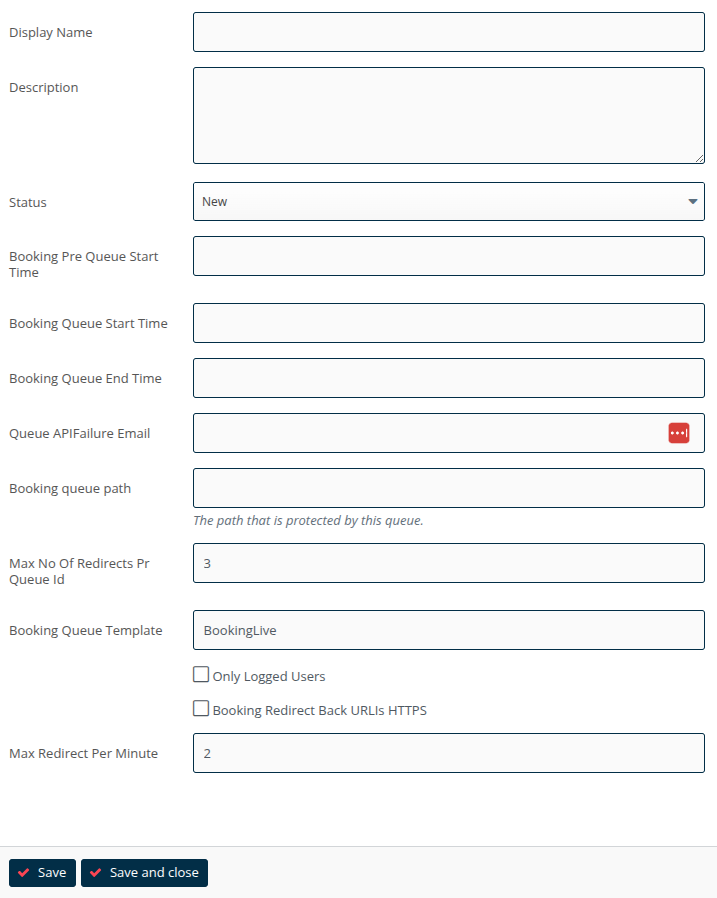
Fields on this form,
Display Name: The name of this Queue.
Description: Short text describing the Queue.
Status: The status of this Queue the Queue status can be New, Active, Inactive and Error.
Booking Pre Queue Start Time: The date and time the Pre queue phase will start.
Booking Queue Start Time: The date and time that the Queue phase will start.
Booking Queue End Time: The date time that the Queue phase will end.
Queue APIFailure Email: An email to notify on queue errors.
Booking queue path: The path that is protected by this Queue.
Max No Of Redirects Pr Queue Id: DON'T TOUCH.
Booking Queue Template: Styling of Queue pages DON'T TOUCH.
Only Logged Users: Only allow logged in users to enter the queue.
Booking Redirect Back URLIs HTTPS: DONT TOUCH.
Max Redirect Per Minute: How many users to allow onto the booking pages per minute.
"Save and Close" and the defined queue will be passed to our queue provider the next time the scheduled task is run and will be set to "Active".
The Queue will now protect the specified "Booking queue path" between its "Booking Pre Queue Start Time" and "Booking Queue End Time".